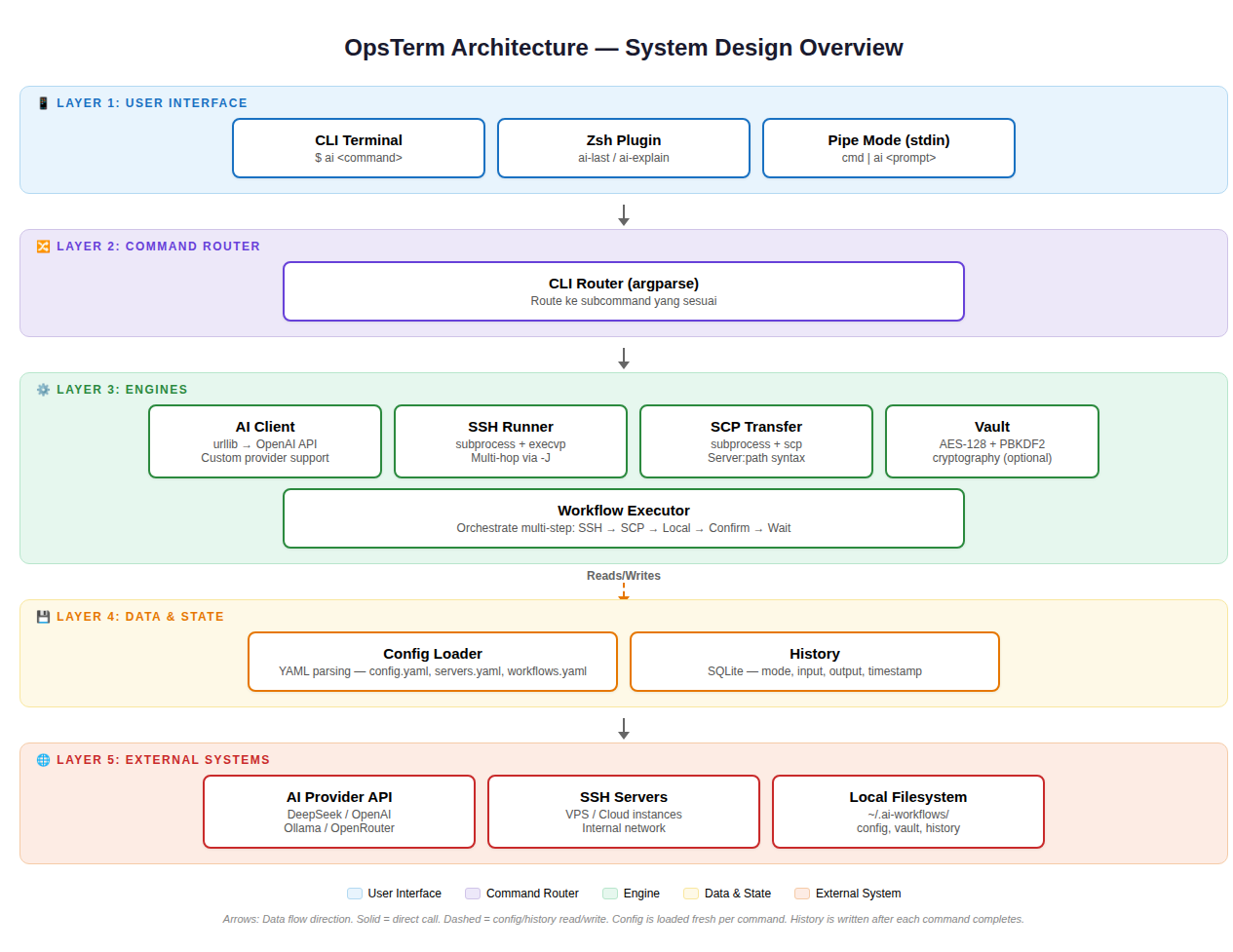
Welcome to the OpsTerm documentation! Here you'll understand how OpsTerm works, the technologies it uses, and why it's designed the way it is.
| Document | Description | Also available in |
|---|---|---|
| 📐 Architecture & System Design | How OpsTerm works — the flow from user typing a command to execution | 🇮🇩 Bahasa Indonesia |
| 🔧 Tech Stack | Technologies used — languages, libraries, protocols, formats | 🇮🇩 Bahasa Indonesia |
| 🤔 Design Decisions | Why it's designed this way — rationale behind every technical decision | 🇮🇩 Bahasa Indonesia |
| 🎯 Features | All features — complete list with usage examples and use-case matrix | 🇮🇩 Bahasa Indonesia |
| 📊 Architecture Diagram | Excalidraw diagram — open at excalidraw.com | — |
| 🖼️ Architecture Diagram (PNG) | Image version — view directly without opening Excalidraw | — |
┌─────────────────────────────────────────────────────┐
│                  USER LAPTOP                         │
│  ┌───────────────────────────────────────────────┐  │
│  │  $ ai ssh vps-utama                           │  │
│  │  $ ai "how to check disk"                     │  │
│  │  $ docker ps | ai "error?"                    │  │
│  └───────────────┬───────────────────────────────┘  │
│                  │                                   │
│  ┌───────────────▼───────────────────────────────┐  │
│  │           OpsTerm (bin/ai)                     │  │
│  │  ┌─────────┐ ┌────────┐ ┌────────┐ ┌──────┐  │  │
│  │  │ AI      │ │ SSH    │ │ SCP    │ │Vault │  │  │
│  │  │ Client  │ │ Runner │ │ Transfer│ │      │  │  │
│  │  └────┬────┘ └───┬────┘ └───┬────┘ └──┬───┘  │  │
│  └───────┼──────────┼──────────┼─────────┼───────┘  │
│          │          │          │         │           │
└──────────┼──────────┼──────────┼─────────┼───────────┘
           │          │          │         │
     ┌─────▼──┐ ┌────▼───┐ ┌───▼────┐ ┌──▼────────┐
     │AI API  │ │SSH     │ │Server  │ │Local File  │
     │Provider│ │ Server │ │Filesys │ │System      │
     └────────┘ └────────┘ └────────┘ └────────────┘
Core principle: OpsTerm runs on your local laptop. The AI lives in your terminal, not on the remote server. So when you SSH into any server, the AI is still available.
~/opsterm/
├── bin/
│   └── ai                    ← Main script (single file, ~1500 lines)
├── completions/
│   ├── opsterm.bash          ← Bash tab completion
│   └── opsterm.zsh           ← Zsh tab completion
├── zsh/
│   └── opsterm.plugin.zsh    ← Zsh shell integration plugin
├── docs/                     ← This documentation
│   ├── en/                   ← English documentation
│   │   ├── README.md         ← Index
│   │   ├── architecture.md   ← Architecture & system design
│   │   ├── tech-stack.md     ← Tech stack details
│   │   ├── design-decisions.md← Design rationale
│   │   └── features.md       ← All features
│   ├── id/                   ← Indonesian documentation
│   │   ├── README.md         ← Index
│   │   ├── architecture.md   ← Arsitektur & system design
│   │   ├── tech-stack.md     ← Tech stack
│   │   ├── design-decisions.md← Design decisions
│   │   └── features.md       ← Fitur lengkap
│   ├── ops-term-architecture.excalidraw ← Excalidraw diagram
│   └── ops-term-architecture.png        ← PNG architecture diagram
├── setup.sh                  ← Install script
├── README.md                 ← English README
├── README.id.md              ← Indonesian README
└── .gitignore
User config (gitignored, stored at ~/.ai-workflows/):
~/.ai-workflows/
├── config.yaml       ← AI provider settings
├── servers.yaml      ← Server list + proxy config
├── workflows.yaml    ← Workflow definitions
├── vault.json        ← Encrypted credentials
├── history.db        ← SQLite history
└── last_*.txt        ← Last command output
pip install needed (except vault encryption)bin/ai can be copied to any server and run immediately